Reviving a Godot Multiplayer Prototype with a Real Backend
Welcome to the last post of 2025. It has been a busy Holiday break for me projects wise. I have several more I'd like to share, but those will have to wait for the New Year!
I have dabbled in games for a while now. I've tried out Unity and Unreal. I did get pretty far in a Unity game called "Letter Drop" about a year and a half ago. I decided it was kind of boring so eventually stopped, but it was fun to make and did work. I was going to try and get a web build for it so I could put it on the site, but unfortunately I cannot get Unity to open it anymore.
At some point after I abandoned that idea, I learned about the Godot Engine and decided to try that. I do like C# as I prefer fully typed languages, and GDScript is similar to Python in that it uses spacing as syntax, which I am not a huge fan of. That said though, it's fine - it has optional types and is simpler to write in general than C#. Godot itself does support C#, but it is more work to use and often has limitations vs using GDScript, so I would say it is generally better to stick with GDScript as a start.
The idea here wasn't to get back into game-dev. I genuinely enjoy making games, but what I wanted to focus on here was the backend and hosting. The goal was to have something playable to show while forcing myself to discover the real-world multiplayer and infrastructure problems that don't show up running games locally.
Where It Started
This Brackeys YouTube tutorial is where things started over a year ago.
I personally really enjoy multiplayer games, and a little later I found another tutorial by BatteryAcidDev that built on this by adding multiplayer support. That got me started with the multiplayer portion of things. I added my own tweaks as I followed along with that tutorial.
Then last December I bought my server and I decided there was no way I could make games and focus on homelab things too, so I stepped back from trying to make a game. I even posted about that on X (I haven't done a lot of the playing games part still to be honest).

I stayed away from game dev related things for pretty much the whole year. I worked on setting up my homelab, discovering new services to host, and more recently developing or tweaking several custom applications I host on my homelab (thanks in no small part to AI tools!). Through that time, YouTube's algorithm certainly did not forget about my previous interests. There is often some game related thing in my feed and my interest never waned.
So with some extra days off I thought about what I could do that would not necessarily be game dev, but more focused on the hosting side of things. Of course you cannot host a game without having a game to host, so digging that previous multiplayer project up seemed like the natural thing to do. The game itself already existed in a rough but playable form; what was missing was any kind of real backend or deployment story.
The Goal
When I set out to do this, I decided I wanted the following:
- Hosted on my homelab
- Multiplayer game in Godot that I could get into a playable, web-friendly state
- Backend server that could scale instances and remain easy to deploy
- Matchmaker backend must be usable for other games as well (even Unity potentially)
- Separate portal site to list the games available (in case I want to experiment more, but also should look cool)
- As secure as possible. I didn't want to expose anything directly for this
- 100% functional locally for testing
How I Did It
Matchmaker Backend
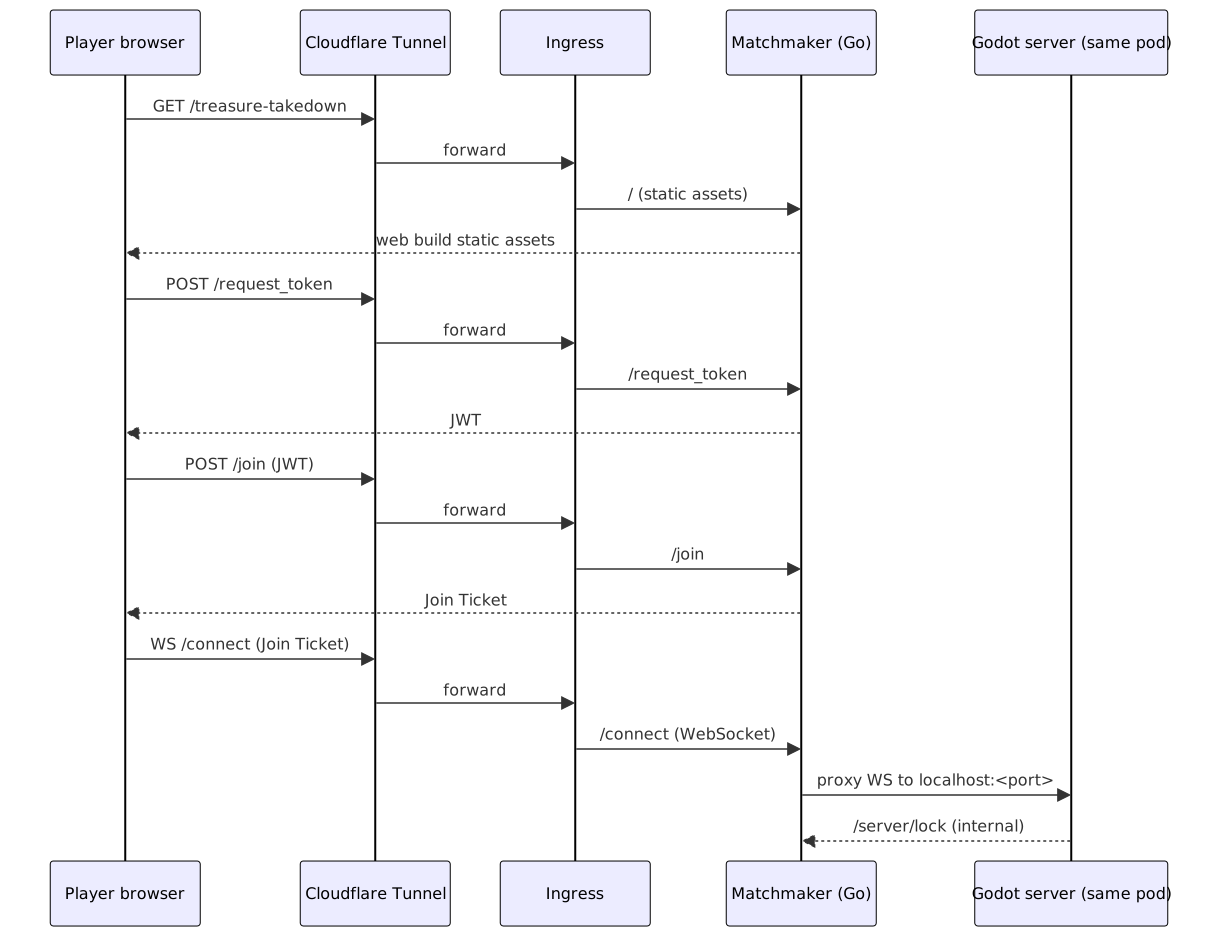
I wrote the matchmaker in Go. It’s a small, self-contained service with clear responsibilities, and Go felt like a great fit: fast, statically typed, easy to reason about, and trivial to ship as a single static binary. It also plays nicely with WebSockets, Prometheus metrics, and Kubernetes, which made the operational side of things much easier.
Since I was removing the P2P hosting option, the backend responsible for handling connections to the dedicated server also had to be able to run locally so I could test the game end-to-end. That made it easy to validate not just the game flow, but also that the matchmaker logic, admin UI, and metrics all worked properly.
Homelab Hosting & Scaling
Packaging the Godot server and the Go-based matchmaker into a single image made deployments simple and predictable with Kube Manager (custom app I made, will post about this later).
I went with simple vertical scaling as it was the easiest, although I found Agones which seems really neat and something I want to experiment with later.
I created a separate container & deployment with just a basic nginx config to serve static files for the game selection site. This was easier to manage than configuring my existing Caddy instance in Docker for the subdomain and adding that extra website content there. I also thought it made sense to be seperate from the matchmaker backend itself since it doesn't need to share anything with that container.
Security
Originally I had planned for a separate cluster for public facing applications in general. I had designed my Kube Manager application with this in mind. I decided that I would go with separate namespaces and utilize Network Policies along with strict restrictions on the pods and Namespaces instead to start. A new cluster requires more setup and would complicate monitoring and database setup, etc. I will still probably go this route eventually though as it is a good way to dogfood Kube Manager features.
On the application layer, I implemented several measures to secure the matchmaker and game servers:
- Stateless Authentication: I use JWTs to identify users. When starting a multiplayer game, an initial request is made to
/request_token. This token is required to call the/joinendpoint. - One-Time Tickets: To prevent unauthorized connections to running games, I implemented a ticket system. Since the game servers run on predictable ports, simply knowing the port could allow anyone to connect via Websocket after getting a JWT from
/request_token. The/joinendpoint issues a short-lived, single-use ticket. The WebSocket proxy at/connectrequires this ticket to establish a connection, effectively preventing port scanning and replay attacks. - Rate Limiting: I also stricly rate limit requests to
/request_tokenand/jointo prevent abuse and DoS attacks.
WebSockets For Communication
In its original state, the game used a simple host/client P2P setup built on Godot’s ENet multiplayer networking over UDP, which worked well locally. The first issue was deployment: I don’t expose my servers directly to the internet (and don’t intend to), and Cloudflare Tunnels don’t support UDP traffic, so keeping that approach wasn’t an option. I also wanted to support a web build so the game could be easily hosted on a website, and browser-based builds don’t support raw UDP either.
Godot does support WebRTC, but it requires a signaling backend and has its own complexity around NAT traversal and relays. Given those constraints, and the fact that I wanted a simple, server-authoritative model that was easy to deploy and observe, WebSockets ended up being the most practical choice.
Multiplayer Fixes
After some minor tweaks to use WebSockets and to get a server running I could connect to, adding latency of working over the web surfaced quite a few issues with my Godot multiplayer code itself. One such issue was that after joining, players were in the game according to the server logs but I kept getting an issue where my LobbySynchronizer node was not found and the players would not show up on the lobby screen. It seems this was because the server was sending data for it before the client loaded the scene in.
This was solved by using RPCs from the server to clients when players in the lobby changed instead of synced variables that I had been using. Synced variables seemed to work fine originally, but once latency was introduced the timing assumptions seemingly fell apart. There ended up being a few cases where I switched to RPCs to fix similar issues. I suspect this was perhaps not necessarily the synced variables, but related to changing scenes and how fast they loaded on the server vs the clients. Trying to sort that out would have been much more work than just switching to RPCs, so I didn't dig too much into it.
I will say that working on multiplayer features with Godot ends up being very easy due to the built-in functionality of starting multiple instances from the editor. Here's how that looks with 3 clients and a dedicated server:


The Result
I now have things in a place where I am happy with them. I did have to do a bit of actual game dev. There needed to be a way to finish the game, so it's actually playable. I also had to make some fixes for gameplay bugs that existed and tweak the font as the original one I had made it very difficult to tell letters apart (which is important when telling someone a room code to use). The game itself is still very simple, but it exists to exercise the multiplayer and backend pieces. For that, it does exactly what I had in mind.
As I mentioned, I made a nice landing page/game selection site at play.jasongodson.com. Try the Treasure Takedown game (the only one there at the moment). Now I haven't tested how well this scales outside of a few people on a couple servers, so if it ends up getting a lot of traffic who knows what it will do.

Of course being a bit of a metrics/dashboard nerd, I also created an admin page so I could see how many games and players there are and I set up and endpoint for Prometheus to scrape so I could create a nice Grafana dashboard. I'll certainly be keeping an eye on these after I publish this post!


This experience taught me more about the multiplayer and infrastructure side of games and it was really fun. I've come to much prefer working with Kubernetes over managing Docker on VM's (yes, even in a homelab) and I can see myself leaning into it more in 2026, probably migrating some of my Docker services over. I also want to try out Agones as an existing Kubernetes-native option for game server hosting.
See you in 2026!